Return to next-hop missionReview supports the next application check; visiting this page does not earn points.
Junior network engineer portfolio · Cisco Packet Tracer
Lab 01 — Two-Subnet Office LAN
A small office with Sales and Ops on two /26 subnets, joined by a single 2911 router. Built in Packet Tracer with IOS CLI, a security baseline, verification, and four break/fix scenarios.
Cisco Packet TracerSubnetting /26Star topologyCompTIA A+ / Network+CCNA fundamentals
Open lab01.pkt in Cisco Packet Tracer (NetAcad). The file is hosted on this site.
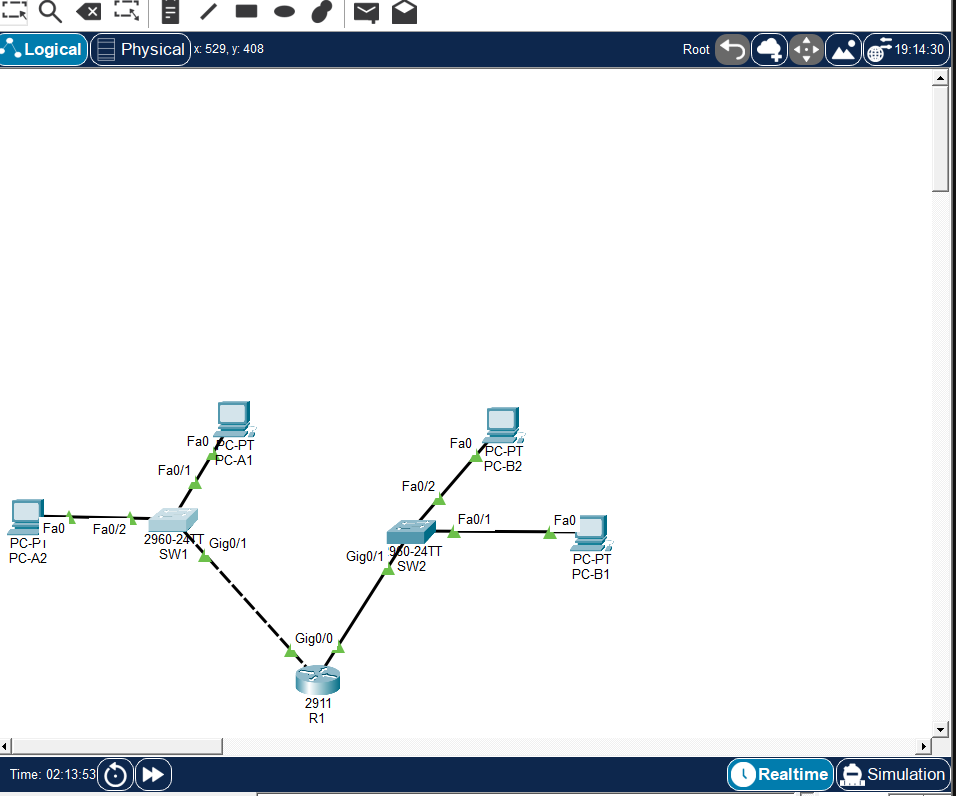
Scenario
A small office has two departments, Sales and Ops. Each department needs its own subnet so traffic and broadcasts stay separated. A single router connects the two subnets so the departments can still talk to each other.
- Devices: Cisco 2911 (R1), two 2960-24TT switches (SW1, SW2), four PCs
- Cabling: copper straight-through (unlike devices: PC to switch, switch to router)
- No static or dynamic routing — R1 is directly connected to both subnets
Subnetting: 192.168.10.0/24 → two equal /26s
Requirement: two equal subnets with at least 60 usable hosts each. 2^6 = 64 addresses (62 usable) → 6 host bits → /26. Mask 255.255.255.192; block size 64. Spare .128/26 and .192/26 are left unused for growth.
| Subnet | Network | Usable range | Broadcast |
|---|---|---|---|
| A — Sales | 192.168.10.0/26 | .1 – .62 | 192.168.10.63 |
| B — Ops | 192.168.10.64/26 | .65 – .126 | 192.168.10.127 |
IP addressing
| Device | Interface | IP address | Gateway |
|---|---|---|---|
| R1 | Gi0/0 (LAN-A) | 192.168.10.1 | — |
| R1 | Gi0/1 (LAN-B) | 192.168.10.65 | — |
| SW1 | VLAN 1 (mgmt SVI) | 192.168.10.2 | 192.168.10.1 |
| SW2 | VLAN 1 (mgmt SVI) | 192.168.10.66 | 192.168.10.65 |
| PC-A1 / PC-A2 | Fa0 | .10 / .11 | 192.168.10.1 |
| PC-B1 / PC-B2 | Fa0 | .74 / .75 | 192.168.10.65 |
Verification (all passed)
| Check | Expected | Result |
|---|---|---|
| show ip int brief on R1 | Gi0/0 and Gi0/1 up/up | PASS |
| show ip route on R1 | Two C and two L routes | PASS |
| SW1 / SW2 mgmt SVI | Vlan1 up with correct IP | PASS |
| Same-subnet ping (PC-A1 → .11) | Replies | PASS |
| Gateway ping (PC-A1 → .1) | Replies | PASS |
| Cross-subnet ping (PC-A1 → .74) | Replies (first run may drop 1–2 packets while ARP resolves) | PASS |
| tracert PC-A1 → PC-B1 | 2 hops: gateway .1, then .74 | PASS |
| PC-B2 → SW1 mgmt | Replies across subnets | PASS |
192.168.10.0/24 is variably subnetted, 4 subnets, 2 masks
C    192.168.10.0/26 is directly connected, GigabitEthernet0/0
L    192.168.10.1/32 is directly connected, GigabitEthernet0/0
C    192.168.10.64/26 is directly connected, GigabitEthernet0/1
L    192.168.10.65/32 is directly connected, GigabitEthernet0/1
Break / fix — prediction before test
| Scenario | Prediction | Result and lesson |
|---|---|---|
| Missing default gateway on PC-B2 | ARP, then silence | Ping timed out. R1 routes the request over, but PC-B2 cannot reply to another subnet without a gateway. Same-subnet pings still work. |
| R1 Gi0/1 shutdown | Ping fails | Destination host unreachable. R1 loses its connected route to 10.64/26; show ip int brief shows administratively down. Fix: no shutdown. |
| Wrong mask on PC-A2 (/24 instead of /26) | No traffic goes out | With /24, PC-A2 thinks .74 is local and ARPs on LAN-A instead of using the gateway. Restore 255.255.255.192. |
| Crossover cable SW1 → R1 | Traffic fails | Unlike devices use straight-through. Packet Tracer may still bring Gi links up (Auto-MDIX); the exam still tests the cable rule. |
Key takeaways
- Console, VTY, and enable passwords are separate — VTY needs its own password.
- A switch needs a default gateway only for remote management; its ports forward on MAC address (Layer 2). The mgmt SVI exists so you can reach the switch itself.
- If Sales grows to 100 hosts it needs /25 (.0–.127), which overlaps Ops' .64/26 — Ops would move to .128/26.
- Router ports are off by default; no shutdown brings them up. Amber switch links are Spanning Tree settling — wait for green.
Open lab01.pkt in Cisco Packet Tracer to walk the same topology. Full IOS configs and the lab guide live in the GitHub repo — lab passwords are for this lab only, never production.